 Security Alarms
Categories
- Conventional fire alarm systems
- Wireless Fire Alarm System
- LPCB addressable fire alarm
- Gas detection alarm system
- Electrical Fire Monitoring
- Addressable fire alarm system
- Fire Alarm Fire Extinguishing
- Fire Alarm gas fire-extinguish
- Commercial Burglar Alarm System
- Security Service Equipment
- Commercial security solutions
- Industry Security Equipment
Manufacturers
Languages


Fire Control Panel Troubleshooting
Is your fire control room equipment malfunctioning? You can troubleshoot these 3 common problems yourself!
The fire control room is the "central brain" of a building's fire safety. If the equipment inside suddenly malfunctions, it not only causes panic but can also create serious safety hazards. Many people, when faced with equipment alarms, blackouts, or breakdowns, immediately think of calling a repairman. However, they don't realize that most common malfunctions can be quickly troubleshooted and resolved by themselves without waiting for professionals!
Today, we've compiled a list of the three most common equipment malfunctions in fire control rooms, along with detailed troubleshooting steps and precautions. Even beginners can easily get started, and this guide can help you quickly restore equipment to normal operation in critical situations, safeguarding the first line of defense for fire safety.
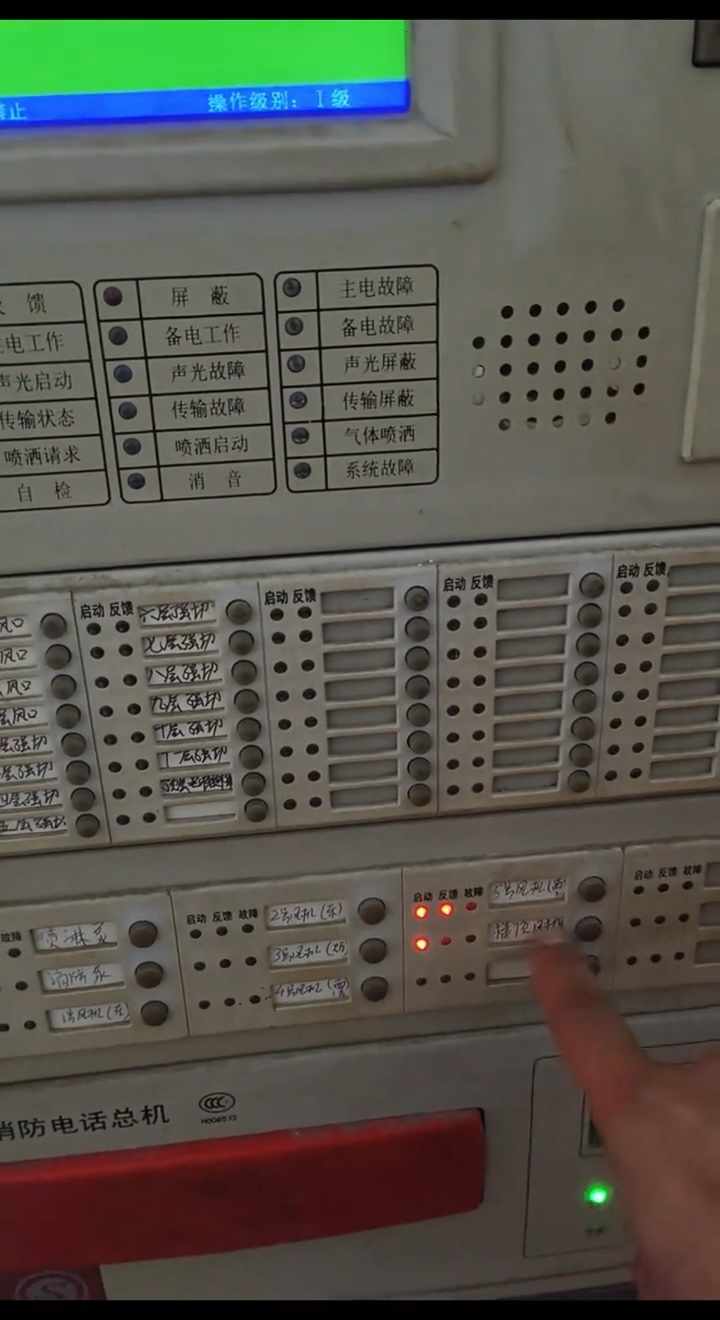
Fault 1: The host computer has a black screen and no power, completely "laid down".
This is the most obvious and worrying malfunction—the fire alarm control panel suddenly goes black, the indicator lights don't light up, and there's no response to any operation, just like a complete "power outage and shutdown." Many people mistakenly think the control panel is broken, but it's most likely a problem with the power supply, which is quite simple to troubleshoot.
Investigation steps (in order of priority, to get it done in one step)
1. First, check the external power supply: Check the distribution box in the fire control room to confirm whether the circuit breaker supplying power to the fire alarm control panel has tripped (this is most likely the cause). If it has tripped, first turn off the main unit's power switch, then reset the circuit breaker, and then turn the main unit's power back on to observe whether it returns to normal.
2. Next, check the backup power supply: If the circuit breaker hasn't tripped and the main unit is still black, check the main unit's built-in backup battery (usually located at the bottom or side of the main unit). Check if the battery terminals are loose or disconnected, or if the battery surface is bulging or leaking (bulging or leakage indicates a damaged battery that needs replacement). If the connections are loose, simply tighten them; if the battery is damaged, it can be temporarily replaced with the backup battery to ensure temporary operation of the main unit.
3. Finally, check the power board: If the above two steps are fine and the screen is still black, the internal power board may be faulty (e.g., a blown fuse). It is not recommended to disassemble it yourself in this case. Record the symptoms and contact a professional repair technician for on-site inspection to avoid further damage.
Precautions
Before resetting the air switch, be sure to turn off the main unit power supply to avoid sudden power surge to the main unit; when replacing the battery, pay attention to the positive and negative terminals and do not connect them in reverse to prevent short circuit.
Fault 2: The main unit frequently alarms, but cannot detect a fire (false alarm).
More common than a black screen is a host frequently emitting alarms and displaying "fire alarm" on the screen, but upon inspection, there is no sign of fire—this is a typical "false alarm" malfunction. False alarms not only interfere with normal operation but can also desensitize people to real fire alarms, and must be dealt with promptly.
Troubleshooting steps (precise location, quick resolution)
1. First, identify the alarm location: On the fire alarm control panel screen, find the "location number" and "location name" (such as "first floor lobby smoke detector") corresponding to the alarm information to accurately locate the specific alarm device and avoid blind troubleshooting.
2. Check the on-site equipment environment: Arrive at the alarm location and check whether there are any interfering factors around the corresponding detector (smoke detector, heat detector, etc.): Is there smoke, dust, or steam near the smoke detector (such as near the kitchen or bathroom)? Is there any high-temperature equipment (such as radiators or ovens) near the heat detector? Is the surface of the detector blocked or covered (such as dust accumulation or debris blocking it)?
3. Clean or reset the equipment : If the false alarm is caused by dust or smoke, gently wipe the detector surface with a dry cloth to remove dust and debris. Then return to the fire alarm control panel and perform the "silence" and "reset" operations to observe whether the control panel stops alarming. If the detector's sensitivity is abnormal (e.g., due to aging), the detector can be temporarily disabled (after disabling, contact maintenance personnel promptly for calibration or replacement) to prevent further false alarms.
Precautions
It is strictly forbidden to arbitrarily disable the alarm function of the fire alarm control panel; after disabling a faulty detector, be sure to make a record and contact maintenance personnel within 24 hours to avoid missing any real fire alarms.
Fault 3: The host computer displays "Communication Failure" and the device is disconnected.
The fire alarm control panel screen frequently displays "communication failure" messages, accompanied by the fault indicator light illuminating. This means that the control panel has "lost contact" with on-site detectors, modules, manual alarm buttons, and other equipment, and cannot receive equipment signals normally. This type of failure will cause the control panel to be unable to respond to the fire situation on-site in a timely manner, posing an extremely high risk.
Troubleshooting steps (focus on the lines and check them one by one)
1. First, confirm the scope of the communication failure: Check the fault information on the host screen to confirm whether it is a "single device communication failure" or a "multiple device communication failure" (single device failure is mostly due to the device itself or a local line problem, while multiple device failure is mostly due to a bus line problem).
2. Troubleshoot wiring connections: Locate the wiring terminals corresponding to the faulty equipment (usually inside the fire alarm control panel or the floor junction box). Check for loose, disconnected, or short-circuited wiring, or for damage or aging of the wiring sheath (e.g., chewed by rats or damaged by moisture). If the wiring is loose, simply tighten the terminals. If the wiring is damaged, temporarily repair it by wrapping it with waterproof tape, and then contact a professional to replace the wiring.
3. Check the equipment itself: If it is a communication failure of a single device and the problem persists after checking the line, the device can be swapped with a normal device (for example, swap the smoke detector on the first floor to a normal location on the second floor). If the fault moves with the device, it means that the device itself is damaged and needs to be replaced; if the fault is still in the original location, it means that the line in that location is the problem and the line should be checked again.
Precautions
When troubleshooting the lines, always turn off the power to the host computer and the corresponding lines first to avoid electric shock. After the lines are repaired, restart the host computer and perform a "reset" operation to confirm that communication has returned to normal.
Important reminder: Do not attempt to troubleshoot these two situations yourself!
The above three types of malfunctions are all "common minor problems" with fire control room equipment and can be troubleshooted and resolved by yourself. However, if you encounter the following two situations, you must immediately stop operating the equipment, turn off the power to the relevant equipment, and contact professional fire protection maintenance personnel to avoid danger:
The host computer experiences core failures such as "system failure" or "motherboard failure", making it impossible to perform any operations, or accompanied by abnormal noises, smells, smoke, etc.
During the investigation, it was found that the lines were severely aged, short-circuited, or leaking electricity, or that the equipment was damaged in large areas or caught fire.
The proper functioning of equipment in the fire control room is crucial for building fire safety. Mastering these simple troubleshooting methods can quickly resolve common malfunctions, avoid unnecessary trouble, and promptly identify potential equipment hazards to prevent problems before they occur.
Finally, a reminder: fire-fighting equipment needs to be inspected and calibrated regularly. It is recommended to conduct a comprehensive inspection of the equipment in the fire control room every quarter and a professional test every year to ensure that the equipment is always in normal working condition and to safeguard the bottom line of fire safety!
More Information
Bestsellers
- High Sensibility smoke and heat...
- Audio visual alarm conventional...
- Conventional fire alarm sounder...
- Conventional manual call point ...
- Horn strobe flash and sounder fire...
- PIR detector solar power wireless...
- Wireless infrared beam security...
- 2 fire zone Mini conventional fire...
- Wireless Manual Call Point